The RAW file is present, but after moving to another computer the photograph looks unedited again. This does not necessarily indicate damaged data. Many applications store development instructions separately from the camera original: in a catalog, companion files or a combination of both. A complete archive therefore needs both the source material and the information describing its edits.
Distinguish source, instructions and output
The RAW contains camera-related image data. Editing specifies decisions such as white balance, tonal adjustments and cropping. An exported JPEG shows the calculated result, but does not automatically preserve every option for revisiting those decisions. These three layers serve different purposes.
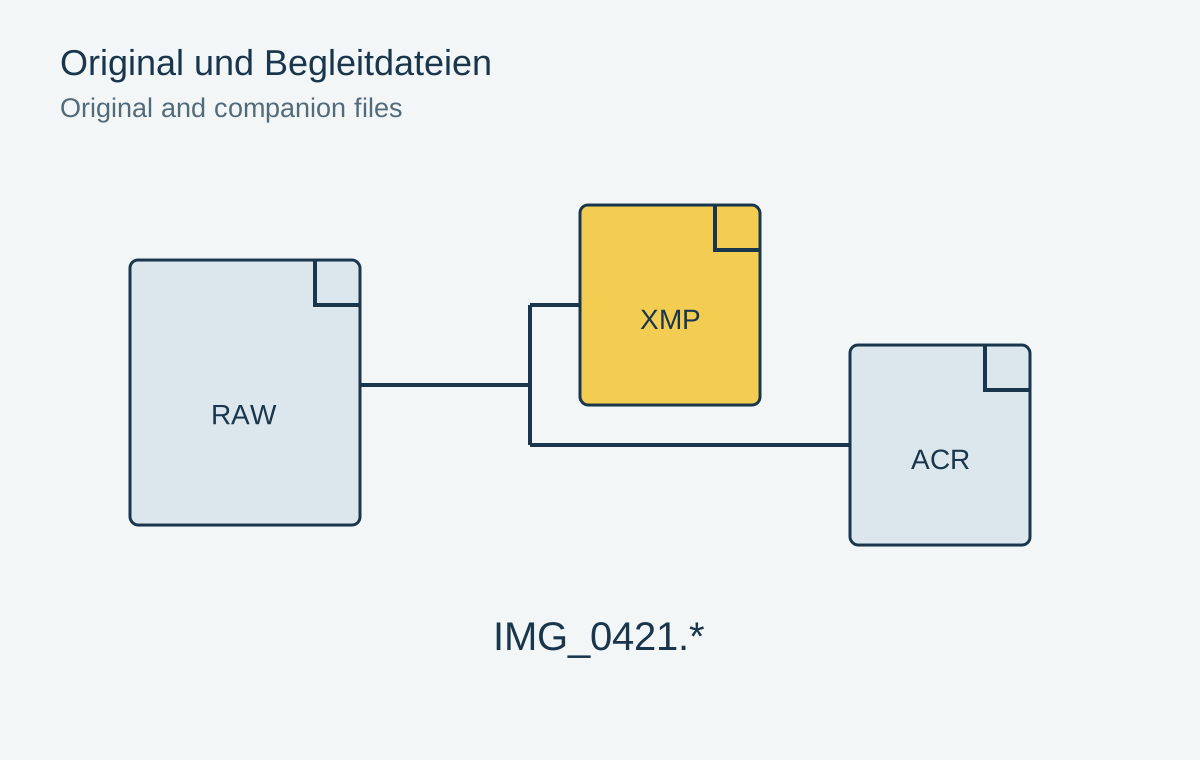
A sidecar often sits beside the original and shares its filename stem with a different extension. For example, IMG_0421.xmp might contain metadata and editing information associated with IMG_0421.CR3. This is a naming example, not a promise that every application supports that RAW format or every setting described in the companion file.
The catalog may contain additional information that is not fully written to a sidecar. Depending on the application, this can include collections, editing history or software-specific states. Backing up XMP files alone therefore replaces neither the originals nor a complete catalog backup.
Do not filter for just one extension
Use a newly edited test photograph to see which files your particular application creates. Adobe documents ACR companion files alongside XMP in current Lightroom Classic versions for certain larger editing data. An older backup script that includes only RAW and XMP can miss these additional components.
Copy associated files together and preserve their names. Renaming only the RAW outside the photo manager may break its association with a companion. An import filter that discards small unfamiliar files as unnecessary is even more problematic. Their size says nothing about their importance to the edit.
Close the application before manually copying its catalog. Also check whether changes have already been written to the intended companion files. A file from last week may exist without containing today's crop. Its modification date offers a clue, but actually restoring the edit is a better check.
Open the edit through a test workflow
Place a copy of a small project in a separate folder. Open it through a suitable test library and inspect the crop, local adjustments and color. Merely displaying a thumbnail is insufficient: some applications initially show a stored preview even when the underlying editing information is absent.
Also test exporting a new file. Compare it with a deliberately retained reference output. Small differences caused by software versions or color management are possible; a completely different crop or missing local adjustments suggests an incomplete working state.
For important finished photographs, keep a high-quality rendered output as well. It preserves the intended appearance if the original application later becomes unavailable. It does not replace the editable project, but provides a visible reference for the archive. Record the application and version with the project so that reopening it does not start with guessing which tool was used.
When another application opens the file
A metadata exchange format does not guarantee identical image development. Two applications may read the same exposure instruction but use different starting profiles or tonal calculations. A proprietary mask may be absent altogether. Judge an application change using actual photographs, not merely the fact that an XMP file is recognized.
Choose one photograph with a simple crop and another with several local adjustments. The first tests basic association and geometry; the second tests more complex editing data. Open both from a copy of the project. This prevents a newly used application from silently overwriting the established working version with its own metadata.
If the new tool cannot fully interpret the former edit, two separate goals remain: preserving the RAW as source material and preserving the previous finished appearance. A rendered reference file serves the second purpose. Record which settings did not survive the transition. That information is more useful later than an apparently successful import message concealing unnoticed differences.